
AI Product Photo Editor
Use the AI product photo editor to clean up product images, change backgrounds, and create polished visuals for online stores.

Turn one product shot into a stronger selling image
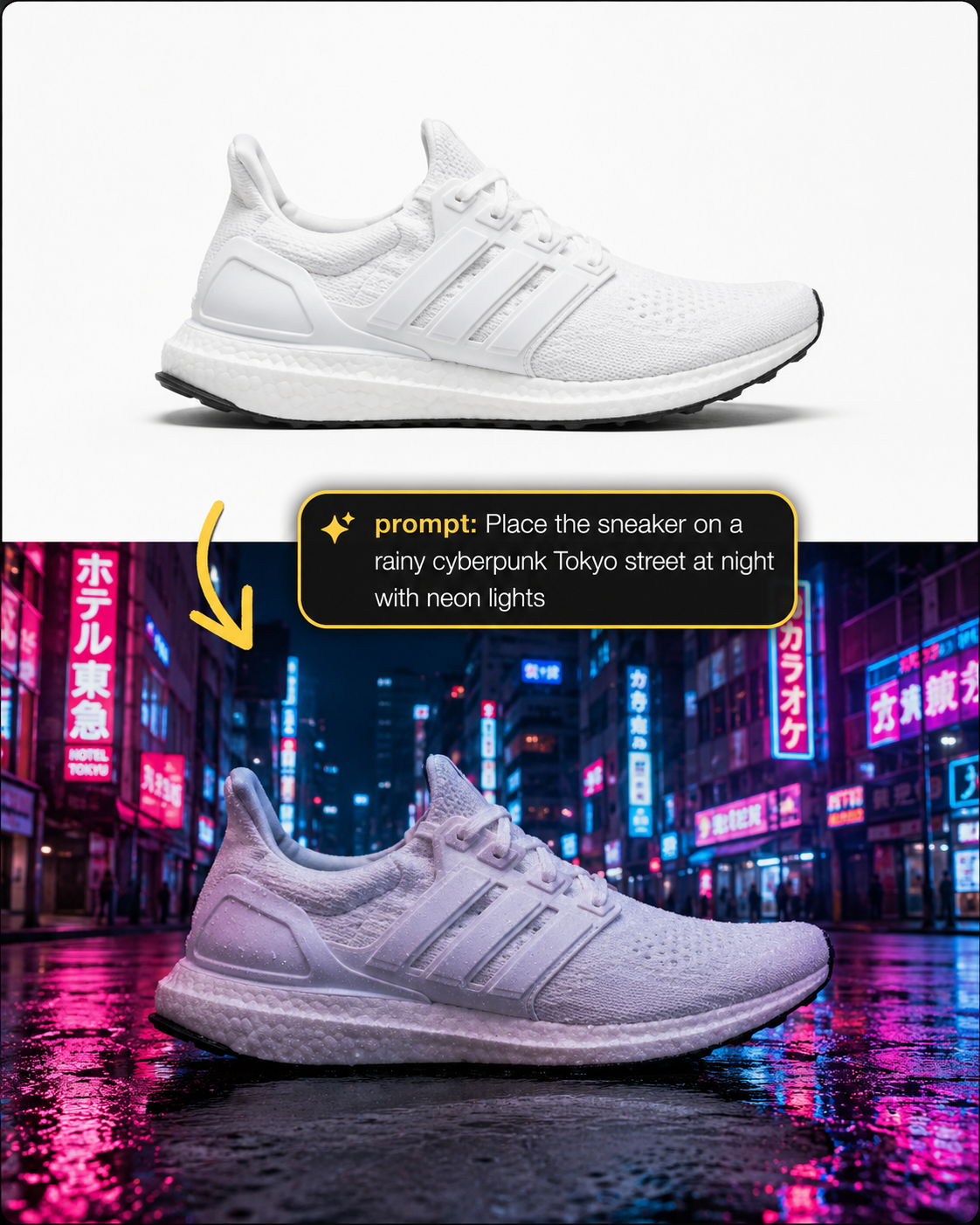
Example outcome
One plain product shot, restaged with a sharper commercial look.
Product photos do not need to look overproduced; they need to look clear, honest, and ready to sell. In the AI product photo editor, write the background and lighting you want, then add the non-negotiables: keep the shape, material, logo, color, and small product details accurate. The AI product photo editor is most useful when those product details stay believable.

Product photo prompt ideas
Think of each prompt like a short shoot brief. Say where the product should sit, how the light should feel, and which details must stay untouched. These AI product photo editor prompts cover white background product photo edits, lifestyle scenes, studio shots, and quick ad visuals.
How to edit product photos without losing the product
Start with a clear product image, give the AI product photo editor a practical brief, then review the result the same way you would check a listing photo.
Upload a product image
Pick the photo where the product is easiest to understand. The AI product photo editor works best when edges are visible, labels are readable, and important details are not buried in shadows or clutter.
Describe the final look
Ask the AI product photo editor for a clean white background, soft studio setup, natural lifestyle scene, or simple ecommerce layout. Then add accuracy rules: keep the real shape, color, labels, texture, and materials.
Preview and refine
Check edges, reflections, shadows, labels, and proportions before downloading. If the image feels too dramatic, run another AI product photo editor pass with simpler lighting or a calmer background.
Better product images with AI
Use the AI product photo editor when a product is good but the photo needs a cleaner background, better lighting, or a more useful ecommerce layout.
A product photo editor should protect the item
A useful AI product photo editor improves the image around the product without inventing a different product. Tell it to keep the shape, color, logo, label, texture, material, and proportions intact. That simple guardrail matters for ecommerce because a polished image still has to match the real item a buyer will receive.
Use AI product photography for fast variations
AI product photography is helpful when you need several versions from one upload: a clean listing image, a lifestyle scene, a square social post, or a studio-style hero shot. The AI product photo editor keeps that work inside one prompt-based workflow, so you can test product photo background ideas without staging a new shoot.
Product image editor details that matter
Small instructions help the AI product photo editor avoid common ecommerce problems such as warped labels, fake colors, floating objects, harsh cutouts, or shadows that do not fit the new scene.
Keep product details
Mention the details that should stay unchanged: logo, label text, stitching, hardware, packaging, color, scale, and material. The AI product photo editor follows a cleaner brief when the product protection rules are explicit.
Choose the background
A product background changer prompt should name the exact setting: clean white background, warm kitchen counter, bathroom shelf, studio sweep, desktop scene, or simple color backdrop. Specific scenes produce more useful product visuals.
Control shadows
Good product photos need contact shadows, not floating cutouts. Ask the AI product photo editor for natural shadows, realistic reflections, clean edges, and lighting that matches the object, then use the AI product photo editor again if the product looks pasted in.
Make versions for channels
A product image editor can create different looks for listings, ads, email banners, and social posts. Keep the product accurate, then use the AI product photo editor to vary the crop, background, and amount of empty space.
Product photo editing notes
Open these notes when you need better prompts for ecommerce photos, white backgrounds, product photo background changes, or AI product photography tests.
Edit a product photo
Upload a product image, describe the store-ready look, and use the AI product photo editor to create a cleaner visual.
Try AI product photo editorProduct photo edits worth testing
Use the AI product photo editor when you need cleaner ecommerce visuals from existing product images.
Online store listings
Create a cleaner listing image from a product shot that has a messy table, uneven light, or distracting background. The AI product photo editor can help produce a white background product photo or a simple studio look while keeping the real item accurate, and the AI product photo editor keeps the workflow quick.
Campaign concepts
Try AI product photography ideas before booking a shoot or building a set. Use the AI product photo editor to place the product in a seasonal scene, lifestyle setup, or polished hero composition, then choose which AI product photo editor direction feels worth producing.
Social and ad visuals
Turn a plain product image into a cleaner square post, ad creative, or email visual. The AI product photo editor can leave room for text, soften the background, and make the product easier to notice in a feed.
AI product photo editor FAQ
Can I use this as a product photo editor online?
Yes. The AI product photo editor runs online in your browser. Upload a product image, write the prompt, and generate a cleaner version without installing a separate product image editor.
What type of product image works best?
A clear product photo with visible edges, readable labels, and enough resolution works best. The AI product photo editor can improve backgrounds and lighting, but the AI product photo editor cannot reliably recover product details that are completely hidden or unreadable.
Can I change a product photo background?
Yes. Use a prompt such as: change the product photo background to a clean studio scene, keep the product unchanged, preserve the label, add natural shadows, and match the lighting. This lets the AI product photo editor work like a product photo background changer while still protecting product accuracy.
Can I make ecommerce product photos for free?
Signed-in users receive free daily credits that can be used with the AI product photo editor. If you need more ecommerce product photo editor tests after the daily credits are used, you can add one-time credit packs.
Will the AI product photo editor change my product?
The AI product photo editor may change details if the prompt is too vague, so add clear rules: keep the original product shape, color, logo, label, texture, material, and proportions. Always review the generated image before using it for a listing or campaign.
Start with a focused AI editing tool
Choose a dedicated workflow, upload a photo, and use a ready-made prompt to move faster.