
AI Hair Color Changer Online
Use the AI hair color changer to change hair color online from a portrait and preview a realistic new shade.

See whether the shade actually suits the portrait
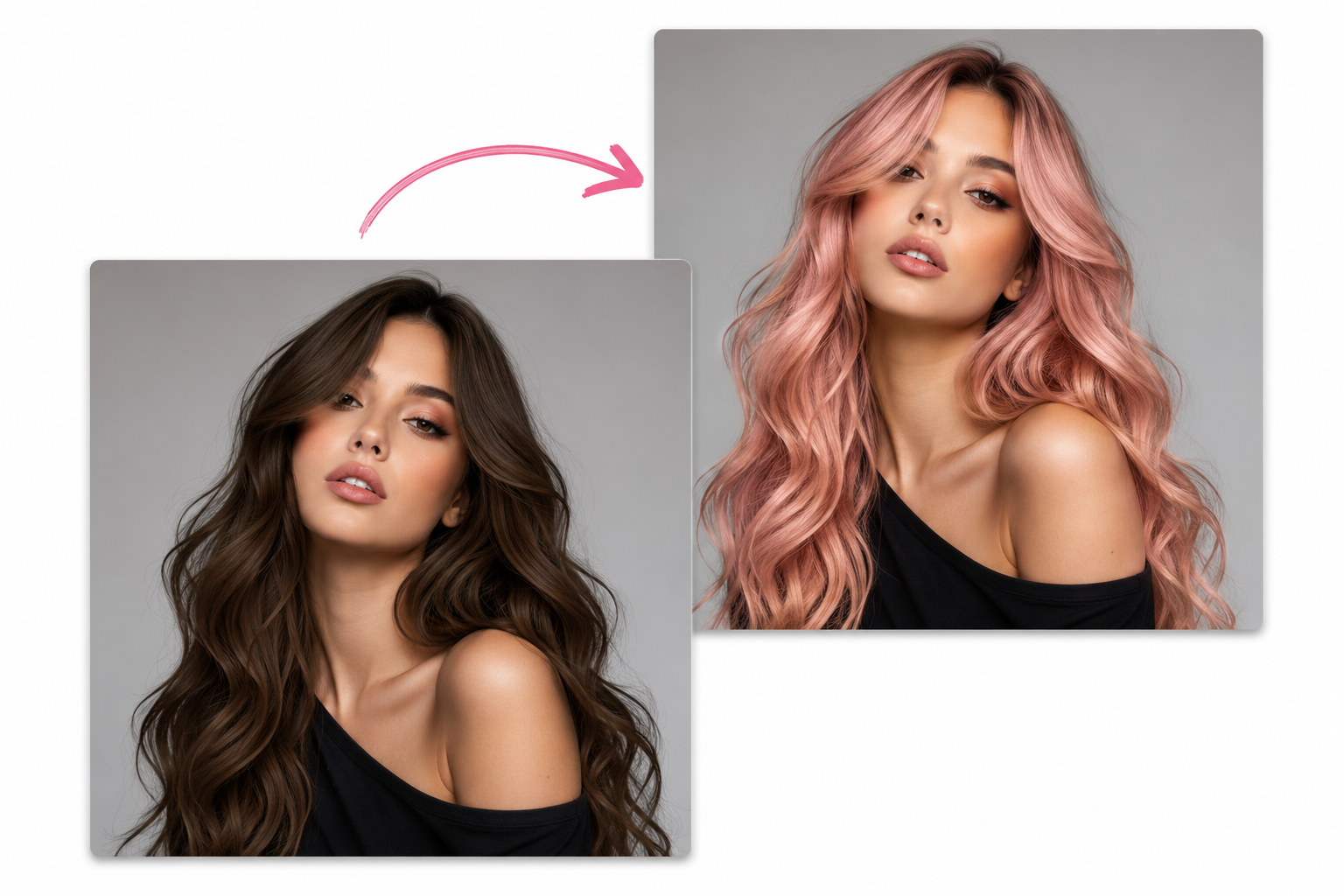
Example outcome
Natural color change with preserved hair texture and portrait lighting.
A good hair color preview should feel like the same person under the same light, just with a different shade. With the AI hair color changer, name the color you want and add a few guardrails: keep the skin tone, preserve the hair texture, and leave the background alone.
Hair color prompt ideas
Start with the kind of shade you would describe to a stylist, then add what should not change. These AI hair color changer prompts are short on purpose, so you can tweak the tone, roots, highlights, or realism without rewriting everything.
How to change hair color with AI
The AI hair color changer workflow stays simple: upload a portrait, describe the shade, preview the edit, and download the result when the hair color looks right.
Upload a portrait
Start with a clear photo where the hair is visible and not heavily covered. The AI hair color changer can follow the hair shape more accurately when the original strands, curls, or waves are easy to see.
Describe the color
Use a prompt for copper, blonde, black, silver, pastel, or any custom color direction. Add words like natural, realistic roots, glossy highlights, or keep skin tone unchanged.
Preview and save
Generate the edit, compare it with the original, and download the result when it works. If the shade is too strong, adjust the prompt and run another AI photo editor pass.
Better AI hair color change results with AI
Use these notes when you want the AI hair color changer to create a believable result instead of a flat filter. The goal is to protect the portrait while changing the hair color clearly.
Give the AI hair color changer visual boundaries
A realistic edit depends on more than naming the shade. The AI hair color changer needs context about lighting, roots, hair texture, highlights, and what should remain untouched. Ask for the new color while preserving face details, clothing, background, and original portrait lighting.
Use hair color changer AI prompts like a color brief
The best AI hair color changer prompt usually includes target color, realism level, hair detail, and protection rules. That structure reduces common mistakes such as oversaturated color, blurry hair edges, changed skin tone, or a hairstyle that no longer matches the source portrait.
Change hair color AI details that look believable
Small prompt choices help the AI hair color changer keep the result realistic, especially when the source photo has curls, waves, highlights, shadows, or layered hair.
Protect the portrait
Tell the AI hair color changer to keep the face, skin tone, expression, clothing, and background unchanged. This keeps the edit focused on hair color instead of turning into a full portrait rewrite.
Keep texture visible
If the photo has curls, waves, braids, flyaways, or layered hair, say that the original texture should stay visible. The AI hair color changer can then recolor the hair without replacing the hairstyle.
Name the finish
Use words such as glossy, matte, soft balayage, natural roots, salon highlights, warm brunette gloss, or cool ash blonde. Finish words help the AI hair color changer understand the style of the color.
Compare several shades
Run one AI hair color changer prompt for copper red, another for champagne blonde, and another for espresso brunette. Saving versions makes it easier to compare the color direction later.
Hair color prompt notes
Open the notes when you need more control over realistic color, creative color, free AI hair color changer usage, or side-by-side shade testing.
Test a new shade
Upload a portrait, describe the color, and use the AI hair color changer to create a visual reference before you commit to the look.
Try AI hair color changerHair color ideas you can test
Use the AI hair color changer for quick visual tests before a salon visit, photoshoot, social post, profile refresh, or creative campaign. It is built for practical image editing, not just playful filters.
Salon previews
Try a new shade before committing to dye, highlights, or a full color change. The AI hair color changer helps you create a visual reference for copper, blonde, brunette, silver, pastel, or richer salon tones, and the AI hair color changer keeps the experiment reversible.
Profile refresh
Explore subtle portrait updates for social profiles, avatars, or personal branding. Use the AI hair color changer to test a clean, polished edit while keeping your original face and expression recognizable.
Creative looks
Test pastel, neon, silver, or editorial colors without changing the original photo. The AI hair color changer can help creators, stylists, and marketers experiment with bolder looks before a shoot, and the AI hair color changer output can become a quick creative reference.
AI hair color changer FAQ
Can I change hair color online for free?
Yes. Signed-in users receive free daily credits that can be used with the AI hair color changer. If you want a free AI hair color changer for more tests after the daily credits are used, you can add one-time credit packs.
What type of photo works best?
A clear portrait with visible hair works best. The AI hair color changer performs better when the hair shape is easy to see, the image is not heavily blurred, and the head is not covered by hats or strong shadows. Cropped hair can still work, but the prompt should be more specific.
Can I change my hair color AI style and keep it natural?
Yes. Include words like natural, realistic highlights, preserved texture, natural roots, and keep skin tone unchanged in your prompt. These instructions help the AI hair color changer focus on recoloring the hair instead of changing the entire portrait.
Can I compare the edit with the original photo?
Yes. Completed results support hold-to-compare so you can quickly check the generated image against the source. This is especially helpful when using the AI hair color changer to judge whether a shade looks realistic on your original lighting and skin tone.
Is this an AI hair color changer online free tool?
The AI hair color changer runs online in your browser and includes free daily credits after sign-in. For ai hair color change free usage, test one shade first, then add realism instructions for pastel pink, silver gray, blue-black, neon, or editorial looks.
Start with a focused AI editing tool
Choose a dedicated workflow, upload a photo, and use a ready-made prompt to move faster.